


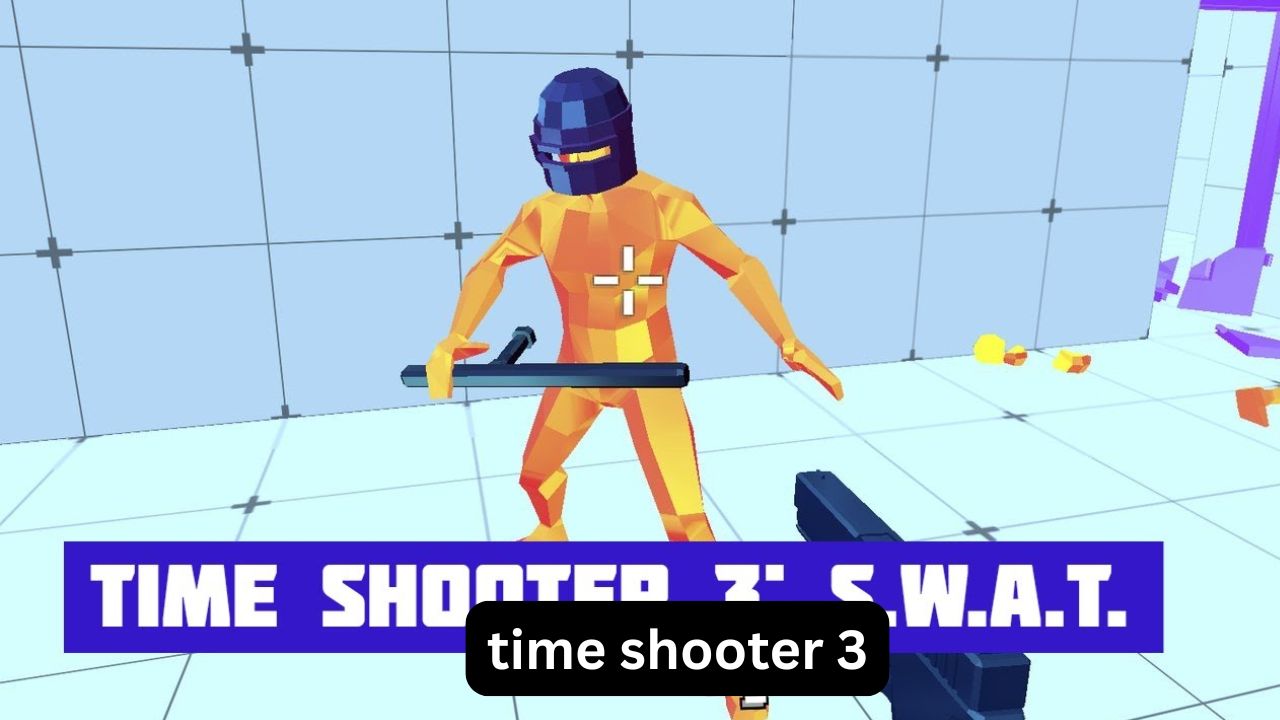
Finding a browser shooter that is easy to start but still makes you think can be surprisingly difficult. Many FPS games rely on constant movement and fast reactions, while Time Shooter 3 takes almost the opposite approach: your movement controls the flow of time. Stop moving, and the action slows dramatically; move again, and enemies, bullets, and other objects begin moving with you.
That simple idea makes Time Shooter 3: SWAT feel less like a traditional run-and-gun shooter and more like a tactical puzzle. You play as a SWAT operative dealing with armed enemies, hostages, shields, body armor, and close-quarters encounters. The game was developed by GoGoMan and released in 2022, continuing the time-based gameplay established by earlier entries in the series.
This guide explains how the game works, how to use its time mechanic effectively, what the SWAT version adds, which controls matter most, and how to approach the game when searching for Time Shooter 3 unblocked, classroom access, or fullscreen browser play.
What Is Time Shooter 3: SWAT?
Time Shooter 3: SWAT is a browser-based first-person shooter built around a distinctive time-control mechanic. The central rule is simple: time progresses when you move. When you stop, the surrounding action slows or effectively freezes, giving you a moment to study the battlefield and decide what to do next.
The SWAT setting gives the third game a different flavor from a standard arcade shooter. Enemies can use shields, helmets, and body armor, while missions involve rescuing hostages and clearing dangerous areas.
You can also interact with weapons and shields rather than simply firing one weapon for an entire level. Doors can be breached with a battering ram, adding another tactical element to some encounters.
The result is a game where positioning, timing, and target selection are just as important as aiming.
How the Time Mechanic Actually Works
The easiest way to understand Time Shooter 3 is to think of movement as a time switch.
When you remain still:
- Enemy movement slows down.
- Bullets move slowly.
- You have time to examine your surroundings.
- You can decide which enemy to target.
- You can plan your next movement.
When you move:
- The battlefield becomes active again.
- Enemies can reposition.
- Projectiles travel faster.
- Your decisions become more urgent.
This creates a useful rhythm:
Move → observe → stop → aim → move again.
A common beginner mistake is holding a movement key continuously. That may work in an ordinary FPS, but here it gives enemies more opportunities to react.
Instead, use short bursts of movement. Move just enough to change your position, stop, examine the scene, and then make another deliberate move.
Why This Feels Different From a Normal FPS
In a conventional shooter, standing still usually makes you vulnerable. In Time Shooter 3, stopping can actually give you a strategic advantage.
That creates an unusual situation: patience can be more valuable than speed.
For example, imagine a bullet traveling toward you while another enemy is preparing to shoot. Rather than immediately running away, you can stop and examine the trajectories. Then make a short movement to avoid the bullet, stop again, and deal with the second threat.
The game therefore rewards controlled movement rather than constant movement.
What Makes the SWAT Version Different?
Time Shooter 3: SWAT expands the basic formula with a tactical hostage-rescue setting.
According to game listings, the enemies have access to SWAT-style equipment including shields, helmets, and body armor. The player can also use weapons such as pistols, machine guns, and shotguns.
Several additions make the encounters more interesting:
Riot Shields
Shields change how you approach an enemy because simply aiming at a protected opponent may not be enough. You need to think about positioning, timing, and alternative targets.
A shield can also become part of your own strategy. The game allows you to pick up and throw shields using the designated control.
Breaching Doors
The SWAT theme also introduces doors that can be broken through with a battering ram. This gives certain encounters a more deliberate room-clearing feeling instead of having every fight start in an open arena.
Hostage Rescue
Hostages introduce another consideration: defeating enemies is not the only concern. You also need to avoid careless attacks that could put the objective at risk.
This makes target selection particularly important.
Time Shooter 3 Controls
The desktop controls are relatively simple, which is useful because most of the difficulty comes from decision-making rather than complicated key combinations.
| Action | Common Control |
|---|---|
| Move | WASD or Arrow Keys |
| Shoot / Pick Up Weapon | Left Mouse Button |
| Throw Weapon | Right Mouse Button or R |
| Pick Up / Throw Shield | F |
These controls are listed by major game portals, although minor differences can occur between browser versions.
A Better Way to Use the Controls
Don’t treat the movement keys like an ordinary FPS.
Try this sequence instead:
- Move a short distance.
- Release the movement key.
- Observe enemy positions.
- Identify the most immediate threat.
- Aim while the action is slowed.
- Make another short movement.
- Stop and reassess.
This method gives you much more control over the battlefield.
Best Strategy for Time Shooter 3 SWAT
There isn’t one perfect tactic for every situation, but several habits consistently make the game easier.
1. Look Before You Move
When entering a new area, resist the urge to rush.
First identify:
- Enemy locations
- Weapons nearby
- Shield carriers
- Hostage positions
- Incoming projectiles
- Potential escape routes
Because the time mechanic gives you opportunities to observe, use them.
2. Deal With Immediate Threats First
Not every enemy represents the same level of danger.
An enemy with a clear shot can be more urgent than one standing farther away. Likewise, a shotgun-wielding opponent in close quarters may require immediate attention.
Instead of simply attacking the nearest target, ask:
“Which enemy can hurt me first?”
That small change in thinking can prevent unnecessary deaths.
3. Use Short Movement Bursts
Long movement sequences are one of the easiest ways to lose control.
Suppose you need to cross a room. Instead of holding W and running straight across, use several short movements.
This lets you repeatedly:
Move → freeze → observe → adjust.
The approach feels slower, but it gives you more information before every major decision.
4. Don’t Ignore Thrown Weapons
Weapons aren’t only useful for shooting.
The ability to throw objects gives you another option when an enemy is difficult to approach. Throwing can also help create an opening before you move into a more dangerous position.
This is particularly useful when your current weapon is empty or poorly suited to the next target.
5. Think About the Bullet, Not Just the Shooter
One of the most useful habits in Time Shooter 3 is watching the projectile itself.
Because bullets slow when you stop moving, you can sometimes judge where a projectile is heading and reposition accordingly.
This produces a unique tactical situation: you aren’t simply reacting to an enemy’s aim; you’re reacting to the path of the bullet.
That distinction is easy to miss when you first start playing.
A Practical Example: Clearing a Difficult Room
Imagine you enter a room containing several enemies, including one with a shield.
A beginner might immediately run toward the closest weapon and start shooting.
A more controlled approach would be:
- Stop and scan the room.
- Identify the enemy with the clearest attack angle.
- Check where the bullets are traveling.
- Move a small distance to improve your position.
- Stop again.
- Pick a weapon or defensive item.
- Attack the most immediate threat.
- Reassess before making the next movement.
The important part is that each movement has a purpose.
You’re not moving simply because the game is a shooter. You’re moving because changing position gives you a tactical advantage.
Time Shooter 3 Unblocked: What Does It Mean?
The phrase “Time Shooter 3 unblocked” is commonly used by players looking for a browser-accessible version of the game, particularly when searching for games that can run without a conventional installation.
However, “unblocked” does not guarantee that a game will work on every school, workplace, or managed network. Network administrators can restrict gaming sites, browser content, or specific domains.
The practical approach is to use a legitimate browser version that is available to you and follow the rules of the network you’re using.
Time Shooter 3 is distributed through browser game portals and can be played without a traditional game installation. CrazyGames lists it as a browser game, while Y8 also provides browser and fullscreen functionality.
Can You Play Time Shooter 3 in Full Screen?
Yes. Browser versions can provide a fullscreen option, although the exact button and interface depend on the portal hosting the game.
Fullscreen is particularly useful because Time Shooter 3 depends heavily on aiming and visual awareness. A larger play area can make it easier to track enemies and incoming projectiles.
If fullscreen isn’t working, check the game’s own controls rather than assuming your browser is malfunctioning. Some versions place fullscreen controls around the game frame, while others use the browser’s fullscreen function. Y8 specifically lists fullscreen as an available feature for its version.
Can You Play It on a Chromebook or School Computer?
This depends on the network and device restrictions.
The game itself is browser-based, so it does not require a conventional Windows installation. Some portals describe versions that run directly in a browser, while support can vary between desktop, tablet, and mobile implementations.
If you’re using a managed school or work device, however, the administrator may restrict access to gaming websites. In that situation, the issue is usually the network or device policy rather than the game’s basic browser requirements.
Common Mistakes New Players Make
Moving Too Much
Constant movement feels natural in FPS games, but it works against the game’s central mechanic.
Better: use small movements and frequent pauses.
Shooting Without Planning
Pulling the trigger immediately can waste an opportunity.
Better: stop, inspect the scene, and choose the target that creates the greatest immediate threat.
Ignoring Shields
A shield carrier shouldn’t be treated like an ordinary enemy.
Better: consider positioning, timing, and alternative ways to create an opening.
Forgetting About Hostages
Clearing enemies quickly is not enough if you ignore the objective.
Better: keep hostage locations in mind before firing.
Treating Every Weapon the Same
Different situations call for different weapons.
A close-range encounter can feel completely different from an engagement across a room. Pick up weapons based on the situation rather than automatically choosing the first one you see.
Three Less-Obvious Tips That Make a Difference
Use the Freeze Time to Think, Not Just Aim
The slow-motion effect is more valuable as an information tool than as a shooting gimmick.
Before moving, use the pause to identify where the next danger will come from. This turns the game’s unusual mechanic into a planning system.
Position Can Matter More Than Accuracy
You can have excellent aim and still lose because you moved into a bad position.
A strong position gives you better visibility, more reaction time, and fewer angles from which enemies can attack.
Your Movement Creates the Difficulty
This is one of the most interesting aspects of the game. The battlefield isn’t simply becoming harder on its own; your movement determines how quickly the situation develops.
That means you can sometimes make a difficult encounter easier simply by making fewer unnecessary movements.
Is Time Shooter 3 Still Worth Playing?
For players who enjoy short browser-based FPS sessions, Time Shooter 3: SWAT offers a distinctive gameplay loop. Its controls are straightforward, but the time mechanic changes how you think about every encounter.
The game is especially interesting if you enjoy:
- Tactical shooting
- Slow-motion combat
- Browser FPS games
- Short replayable sessions
- Weapon-based challenges
- Timing and positioning
- SWAT-style scenarios
It is less about running around continuously and more about deciding when to move and when to stop.
FAQ
Is Time Shooter 3: SWAT free to play?
Time Shooter 3: SWAT is available as a free browser game on multiple gaming portals. It can be played without installing a traditional PC game, although individual websites may have different interfaces or requirements.
How do you play Time Shooter 3?
Move with WASD or the arrow keys, aim and shoot with the mouse, and use the game’s time mechanic to your advantage. Time progresses when you move, so stopping gives you an opportunity to analyze enemy positions and incoming attacks. The objective is generally to eliminate threats while completing the mission objectives.
What is new in Time Shooter 3 SWAT?
The third entry adds a SWAT-focused setting with hostage-rescue missions, shield-equipped enemies, protective gear, and additional tactical interactions such as breaching doors. It retains the series’ central time-moves-with-you gameplay concept.
Can you play Time Shooter 3 unblocked?
“Unblocked” generally refers to browser versions that are accessible on networks where the game site has not been restricted. Whether a particular version works depends on the website, device, and network policies in use. A school or workplace administrator may still restrict access even when the game itself runs in a browser.
Does Time Shooter 3 have fullscreen mode?
Yes, some browser versions provide a fullscreen option. Y8, for example, lists fullscreen functionality for Time Shooter 3: SWAT. Availability and controls can vary depending on the portal you’re using.
What are the main Time Shooter 3 controls?
The commonly listed desktop controls are WASD or arrow keys for movement, left-click for shooting or picking up weapons, right-click or R for throwing, and F for picking up or throwing a shield. Some versions may adjust controls slightly for different devices.
Final Thoughts
Time Shooter 3: SWAT succeeds because it takes a familiar FPS formula and changes one fundamental rule: movement controls time. Once you understand that, the game becomes much more than simply aiming and firing.
The best results usually come from slowing yourself down, observing the battlefield, choosing targets carefully, and moving only when movement serves a purpose. Shields, different weapons, doors, hostages, and incoming projectiles all become easier to manage when you stop treating every encounter like a conventional shooter.
If you’re searching for Time Shooter 3 unblocked, classroom access, SWAT gameplay, or fullscreen browser play, the key thing to remember is that availability depends on the specific website and network. But wherever you can legitimately access the game, the same principle remains useful: don’t rush the battlefield—control it.
